Instagram has officially ended support for end-to-end encryption (E2EE) for its Direct Messages as of May 8, 2026. This move marks a significant shift in Meta’s privacy strategy for the platform. Here is a detailed breakdown of what this means for you and how to manage your data.
Instagram has disabled end-to-end encryption for Direct Messages.
1. What This Change Means for Users
Privacy Shift: Without E2EE, messages are no longer encrypted on your device and are decrypted only on the recipient’s device. Instead, Meta can now access the content of your DMs for moderation.
Safety vs. Privacy: Meta has stated that the decision is partly due to “low usage” of the opt-in E2EE feature. However, security experts note that this change allows Instagram to comply with new regulations (like the U.S. Take It Down Act) that require platforms to scan for and remove illegal content, such as non-consensual deepfakes and child safety material.
Government Access: Since the data is no longer shielded by E2EE, it can now be provided to law enforcement agencies upon legal request.
WhatsApp Remains Encrypted: Meta continues to maintain E2EE on WhatsApp and Facebook Messenger (by default), recommending users switch to those platforms for highly sensitive conversations.
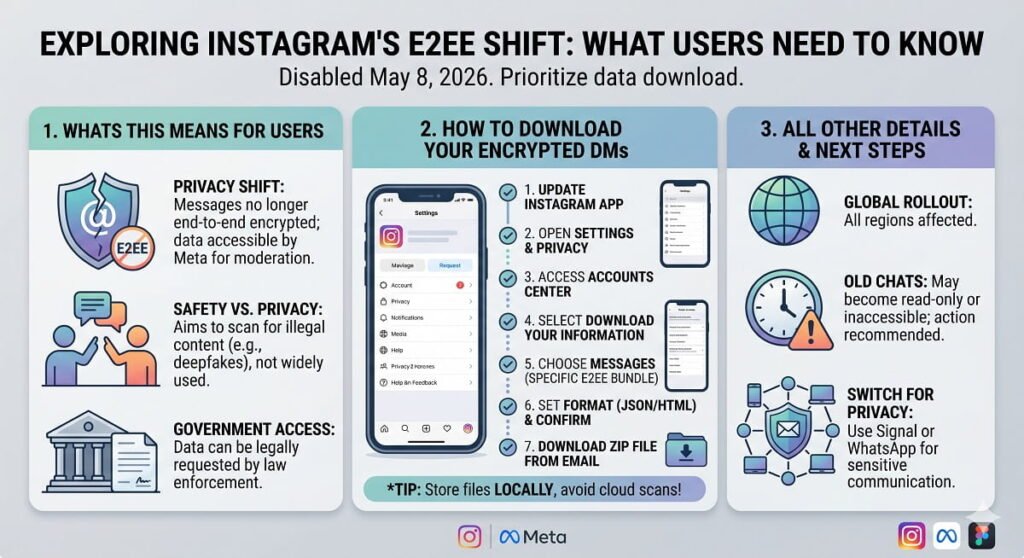
2. How to Download Your Encrypted DMs.
If you previously used “Secret Conversations” or the opt-in E2EE feature on Instagram, you should download your data immediately, as these chats may become inaccessible or lose their protected status. Steps to Download:
| Update Your App | Ensure you are on the latest version of Instagram, as the specific export tool for encrypted chats is only available in recent updates. |
| Go to Settings | Tap the three horizontal lines (hamburger menu) > Settings and Privacy. |
| Access Accounts Centre | Tap Accounts Center (Meta settings) > Your Information and Permissions. |
| Download Your Information | Select Download Your Information. |
| Choose Specific Data | Select Request a download > Choose your Instagram account > Select some of your information and then check Messages |
| Note | Look for a specific option titled “Download Your Information from End-to-End Encrypted Chats” if it appears separately. |
| Format & Submit | Choose JSON (best for compatibility) or HTML, and set the media quality. Tap Create Files. |
| Download | Once the file is ready (this can take a few hours to 48 hours), you will receive an email. Download the ZIP file to your device. |
| Pro-Tip | Store these files locally on your computer or a physical drive. If you upload them to cloud services like Google Drive or iCloud, they may be scanned or indexed, defeating the purpose of having had an “encrypted” backup. |
3. Key Details to Note
Affected Regions: This change is being rolled out globally.
Old Encrypted Chats: There is no official confirmation that old encrypted chats will automatically convert to “standard” chats. Most experts advise that these chats might remain “read-only” or disappear, making the download step crucial.
Security Recommendation: For users who require high-level privacy, switching to dedicated encrypted messaging apps like Signal or WhatsApp is now the standard recommendation for private one-on-one communication.
Also Read: How to Activate Facebook Protect: A Step-by-Step Guide